
Error Servidor LICENCIAS RDS no está configurado. Puede ocurrir que al configurar RDS sobre Windows Server, pasado el tiempo, éste deje de funcionar y nos muestre el error
«Remote Desktop licensing mode is not configured»
Al mismo tiempo, podremos ver warnings en eventos
| Log Name: System Source: Microsoft-Windows-TerminalServices-Licensing Level: Warning Description: The Remote Desktop license server UK-RDS01 has not been activated and therefore will only issue temporary licenses. To issue permanent licenses, the Remote Desktop license server must be activated. |
Para diagnosticar el problema, lanzamos el Diagnóstico de licencias lsdiag.msc, o bien, Administrative Tools -> Remote Desktop Services -> RD Licensing Diagnoser. Podremos ver el siguiente error:
| Licenses are not available for the Remote Desktop Session Host server, and RD Licensing Diagnoser has identified licensing problem for the RD Session Host server. Licensing mode for the Remote Desktop Session Host is not configured. Number of licenses available for clients: 0 Set the licensing mode on the Remote Desktop Session Host server to either Per User or Per Device. Use RD Licensing Manager to install the corresponding licenses on the license server The Remote Desktop Session Host server is within its grace period, but the Session Host server has not been configured with any license server. |
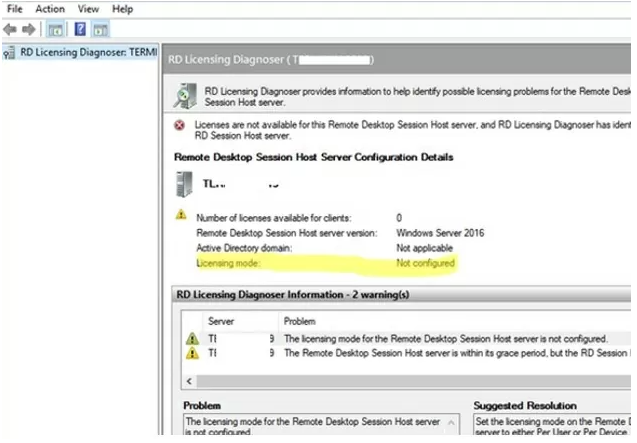
Veamos, cómo configurar el modo de licencias RDS en Windows Server, mediante PowerShell
$obj = gwmi -namespace «Root/CIMV2/TerminalServices» Win32_TerminalServiceSetting
$obj.GetSpecifiedLicenseServerList()
Si el servidor de licencias RDS no está configurado, usaremos el comando
$obj.SetSpecifiedLicenseServerList(«uk-rdslic1.woshub.com»)
Y se pueden configurar por usuario (4) o por dispositivo (2)
$obj.ChangeMode(4)
Más información en el siguiente enlace